> ## Documentation Index
> Fetch the complete documentation index at: https://hercules.app/docs/llms.txt
> Use this file to discover all available pages before exploring further.
# Manage your Agents
> Find, sort, and organize every Agent in your Organization. Favorite the ones you use, put them in folders, tag them, duplicate one, or delete it.
Agents is in private beta, so things may change. If you hit a problem, tell us via [Support &
feedback](/docs/company/contact).
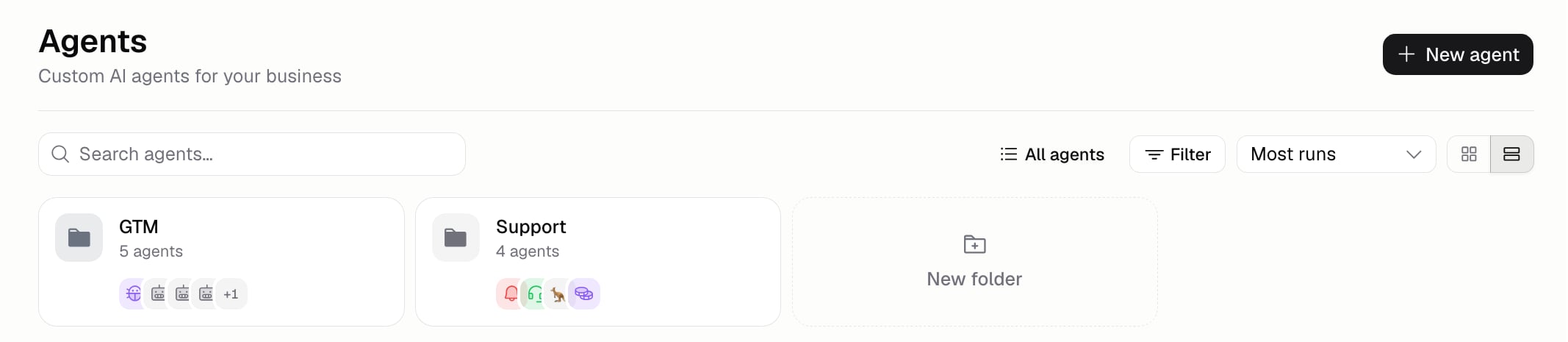
The Agents list shows every Agent in your Organization, with search, sorting, filtering, and folders. Switch to **Agents** at the top of the Dashboard sidebar to open it.
### How do I find an Agent?
Search by name, or sort the list:
| Sort | Puts first |
| --------------- | --------------------------------------- |
| **Most runs** | The busiest Agents. This is the default |
| **Last run** | The ones used most recently |
| **Last edited** | The ones changed most recently |
| **Created** | The newest |
Switch between the card grid and a compact list with the toggle beside the sort. The **Filter** menu narrows things further: show favorites only, or pick one or more tags. Picking a second tag widens the list rather than narrowing it, since it shows Agents with either tag. Searching looks across every folder, and each result tells you which folder it's in.
### How do I keep my Agents to hand?
Favorite them. A favorited Agent appears under **Favorites** in the sidebar, so it's one click away from anywhere. Favorite from the list's **...** menu.
Favorites are shared with your Organization, not personal. Favoriting an Agent puts it in your
teammates' sidebars too.
### How do I group Agents into folders?
Drag an Agent onto a folder, or use **Move to** in its **...** menu. Folders sit as tiles above the list, and Agents that aren't in one sit underneath. If you don't use folders, you only see the list.
### What else can I do from the list?
| Action | What it does |
| ------------------------- | ------------------------------------- |
| **Open** | Goes to the Agent's Instructions page |
| **Favorite / Unfavorite** | Adds or removes it from the sidebar |
| **Move to** | Puts it in a folder |
| **Duplicate** | Makes a copy and opens it |
| **Delete** | Removes the Agent permanently |
### How do I stop an Agent running?
Switch off whatever starts it. [Triggers](/docs/agents/triggers) and [channels](/docs/agents/channels) each have their own on/off toggle, so you can pause one and leave the rest running, then switch it back on later.
To stop an Agent spending too much, set a spend or time limit under **Build** → **More** → **Run limits**. See [Costs and limits](/docs/agents/costs-and-limits).
### How do I organize Agents with tags?
**Build** → **More** → **Details** → **Tags**. As you type, Hercules suggests tags already used on your other Agents, so everyone uses the same words. An Agent can have up to 20.
Add a **Description** beside it so teammates know what the Agent is for. Neither changes what the Agent does, and neither creates a version.
### Additional FAQ
Yes. Click its name in the header and type. The icon beside it opens a picker.
It's removed permanently. Duplicate it first if you might want it back.
An Agent lives in one folder, but can have up to 20 tags. Use folders for who owns what, and tags
for what an Agent is.
It can be, but an [evaluation](/docs/agents/evaluation-runs) measures the change properly, and
[versions](/docs/agents/versions) let you undo it without a second Agent to look after.