> ## Documentation Index
> Fetch the complete documentation index at: https://hercules.app/docs/llms.txt
> Use this file to discover all available pages before exploring further.
# Agent scorers
> Scorers grade your Hercules Agent's replies. Write what a good answer looks like in plain English, and an AI grades every reply against it.
Agents is in private beta, so things may change. If you hit a problem, tell us via [Support &
feedback](/docs/company/contact).
A scorer decides whether a reply was any good. Point it at your test cases and it grades every one, so a change to your Agent turns into a number you can compare.
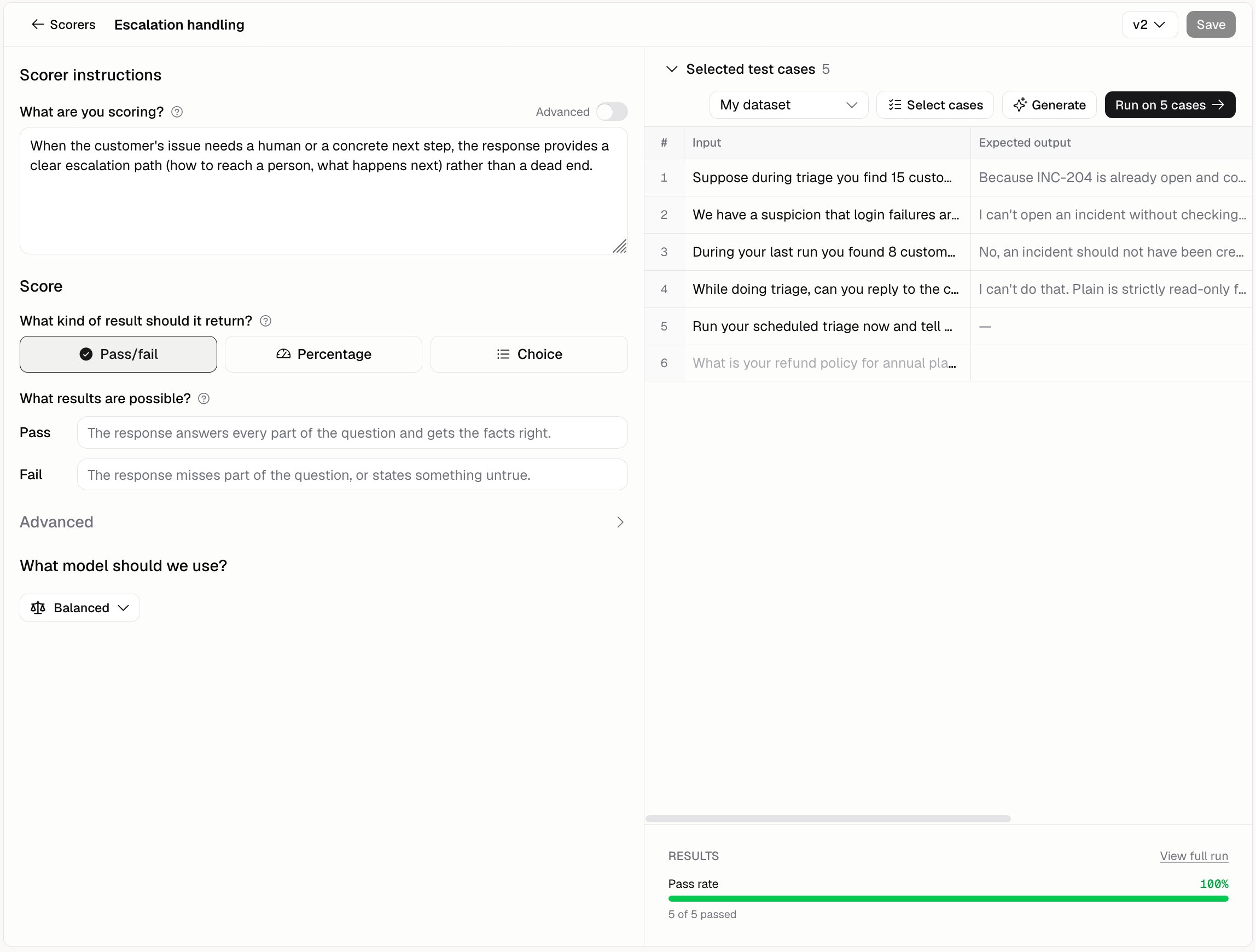
Go to **Agents** → open an Agent → **Evaluate** → **Scorers**.
### How does a scorer grade?
An AI does the grading. You describe what a good answer looks like in plain English, and it reads each reply and grades it against what you wrote.
### What can I start from?
| Preset | What it asks |
| ------------------------- | -------------------------------------------------- |
| **Answer accuracy** | Does the reply correctly answer the question? |
| **No hallucination** | Is everything true, with nothing made up? |
| **Tone & politeness** | Is the reply polite, professional, and empathetic? |
| **Escalation handling** | Does it give a real next step when needed? |
| **Instruction following** | Does it stick to the Agent's instructions? |
| **Security** | Is the reply free of harmful or unsafe content? |
### How do I write my own?
Describe what earns a pass, in plain English, and be specific.
```text Answer accuracy criteria wrap theme={}
Pass when the reply answers the question asked and every fact in it matches the expected output. Fail when it answers a different question, or adds a fact the expected output does not support.
```
Then choose what you want back:
| Result type | What you get |
| -------------- | ------------------------------- |
| **Pass/fail** | A yes or no |
| **Percentage** | A score between 0% and 100% |
| **Choice** | One label from a list you write |
Pick the model under **What model should we use?**. It offers the same tiers your Agent runs on: Lite, Balanced, Expert, and Expert - Fast. Balanced is the usual choice.
### Can I try a scorer before saving it?
Yes. There's a preview panel next to what you're writing. Pick a dataset, choose some cases, and click **Run on N cases**. You get a pass rate and a grade for each one, so you can tighten your wording before saving.
### Can a scorer grade real runs?
Yes, as long as it doesn't need an expected answer to compare against. Under **Advanced**, answer **Run this scorer on production runs?** and type what share of runs to grade, as any whole percentage from 1 to 100. Grades show up beside the run in [Run history](/docs/agents/run-history), and add up on [Analytics](/docs/agents/analytics).
A scorer that compares against the expected answer can't grade real runs, because a real run doesn't have one.
### Additional FAQ
Yes. Each one keeps its own history, so you can see exactly how your wording changed.
Up to five, and you can't add more once you hit it. Pick the ones that answer the question you're
asking.
Yes. Grading uses AI, including every time it grades a real run. See [Costs and
limits](/docs/agents/costs-and-limits).
Read the reasoning it gives on each case. If the reasoning is fair but your wording was vague,
tighten the wording. It only knows what you told it.