> ## Documentation Index
> Fetch the complete documentation index at: https://hercules.app/docs/llms.txt
> Use this file to discover all available pages before exploring further.
# What are Hercules Agents?
> Hercules Agents are AI workers you set up once and then leave running. They work on a schedule, answer your team in Slack, or react to events in your apps.
Agents is in private beta, so things may change. If you hit a problem, tell us via [Support &
feedback](/docs/company/contact).
A Hercules Agent is an AI worker you set up once and then leave running. You write down what its job is, connect the apps it needs, and choose what starts it off. From then on it does the work without you being there.
Hercules Agents are a separate product from the [Hercules App Builder](/docs/apps/quickstart). The App Builder builds apps for you. Hercules Agents do work for you, over and over.
Switch to **Agents** at the top of the Dashboard sidebar to see every Hercules Agent in your Organization.
### What can a Hercules Agent do?
Anything you can describe in writing, using the apps you connect to it. For example:
* Sort incoming support tickets and draft replies
* Post a summary into a Slack channel every weekday morning
* Answer your team's questions in a GitHub pull request
* React to something happening in another app, like a new Stripe payment
### How is this different from the other AI in Hercules?
They do different jobs.
* **Hercules Agents** run a job you set up, over and over, without you there. Something else starts them off: a schedule, another app, or a teammate messaging them in Slack
* **The [Hercules App Builder Agent](/docs/ai/how-it-works)** builds and edits your app while you chat with it, inside the App Builder
* **[Chat](/docs/agents/chat)** answers your questions and works across your connected tools, one conversation at a time, while you're there
### What are the parts of a Hercules Agent?
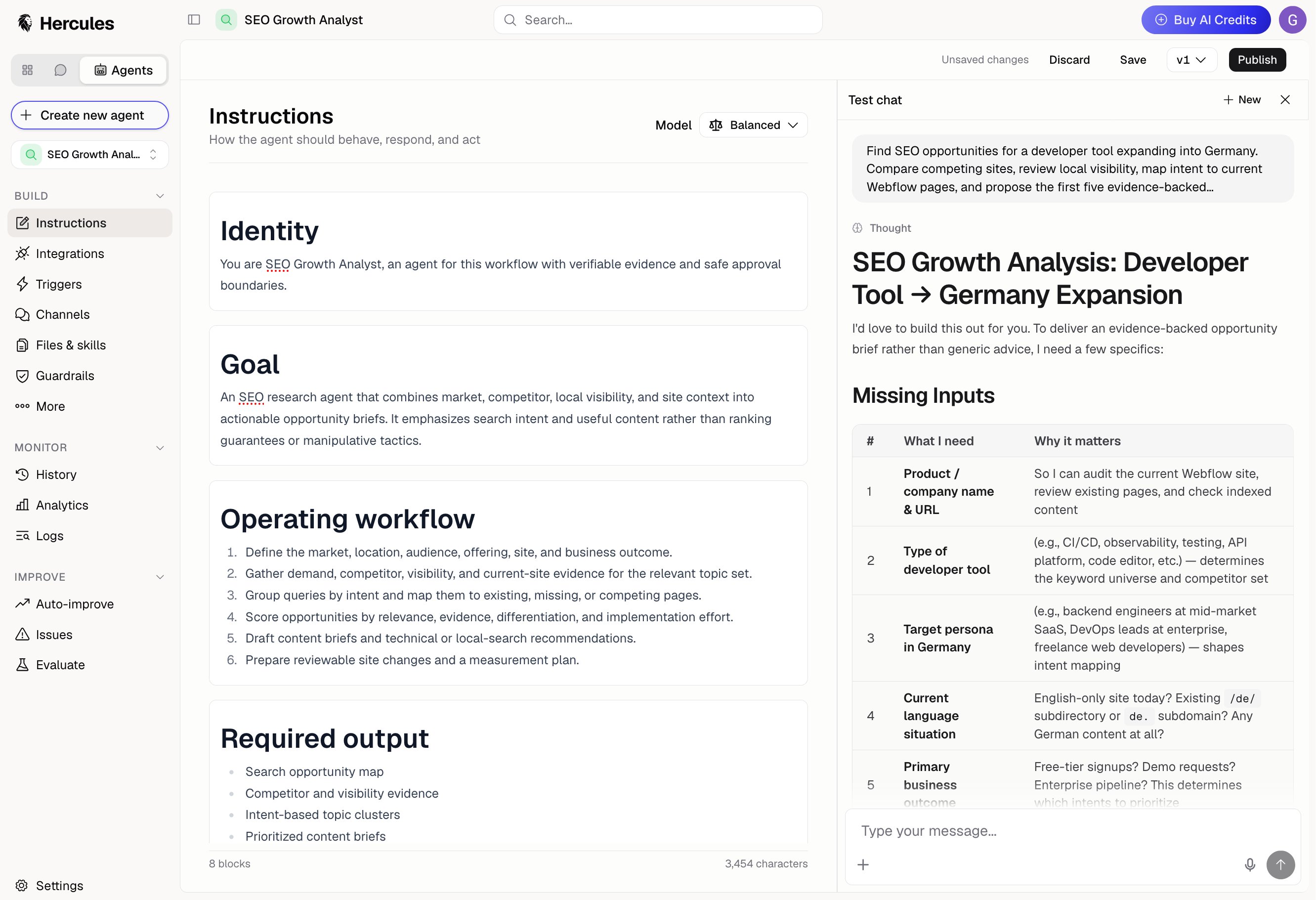
* **[Instructions](/docs/agents/instructions)**: what the Agent should do, written in plain English
* **[Integrations](/docs/agents/integrations)**: the tools and apps it's allowed to use
* **[Triggers](/docs/agents/triggers)**: what starts it off, like a schedule or an event in another app
* **[Channels](/docs/agents/channels)**: where it talks to people, like Slack, GitHub, Linear, or Teams
* **[Guardrails](/docs/agents/guardrails)**: rules it has to follow, checked while it works
* **[Runs](/docs/agents/run-history)**: one job from start to finish. Every run is recorded, so you can read back exactly what the Agent did
### How do I get started?
Start from scratch, from a template, or from a description. See [Create an
Agent](/docs/agents/create-an-agent).
Tell it what to do, and add any files it needs to read.
Open the test chat from the bar above any **Build** page.
Your edits are saved as a draft. Click **Publish** to make them live. See
[Versions](/docs/agents/versions).
Add a trigger or connect a channel, then watch what happens under **History**.
### Additional FAQ
Open an Agent and its pages appear in the sidebar, grouped by what you're doing:
* **Build**: Instructions, Integrations, Triggers, Channels, Files & skills, Guardrails, More
* **Monitor**: History, Analytics
* **Improve**: Auto-improve, Issues, Evaluate
The test chat and the **Save** and **Publish** buttons follow you across every Build page and
Guardrails, so a change and the conversation you're testing it in stay side by side.
Yes. Agents belong to your Organization, so everyone in it can see, edit, and run them.
Agents use AI credits, the same credits as the rest of Hercules. Runs cost credits, and so do
Auto-improve, scoring, and run summaries. See [Costs and limits](/docs/agents/costs-and-limits).
Agents is switched on one Organization at a time. If **Agents** is missing from your sidebar,
contact [hello@hercules.app](mailto:hello@hercules.app).