> ## Documentation Index
> Fetch the complete documentation index at: https://hercules.app/docs/llms.txt
> Use this file to discover all available pages before exploring further.
# App Management
> Manage your apps from the Hercules dashboard. View, duplicate, delete, and transfer apps between organizations.
Manage all your apps from the Hercules dashboard. View, duplicate, delete, and transfer apps between organizations.
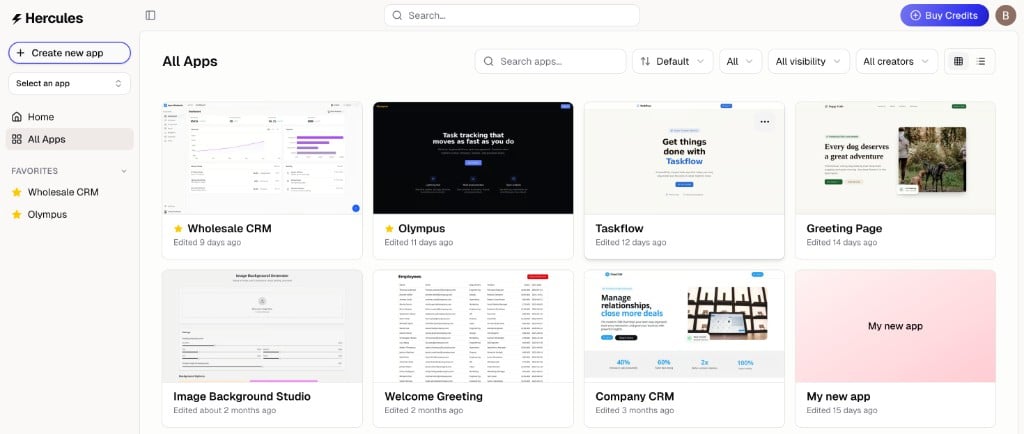
Go to [hercules.app/dashboard/app](https://hercules.app/dashboard/app) to view all apps in your current organization.
See [Transfer an app](/docs/apps/app-transfer) for how to move an app to another organization.
There are two ways to delete an app, depending on your device.
**On desktop:**
1. Go to [hercules.app/dashboard/app](https://hercules.app/dashboard/app)
2. Hover over the app and click the three dots (**More**)
3. Click **Delete**
**On mobile:**
1. Open the app
2. Tap **More** → **Danger Zone**
3. Tap **Delete**
Deleting an app is permanent and cannot be undone. It removes the app, all of its data, and any associated resources.
1. Go to [hercules.app/dashboard/app](https://hercules.app/dashboard/app)
2. Hover over the app and click the three dots
3. Click **Duplicate**