> ## Documentation Index
> Fetch the complete documentation index at: https://hercules.app/docs/llms.txt
> Use this file to discover all available pages before exploring further.

# Push Notifications

> Send push notifications to users. Setup, permissions, manual sends, event-triggered, and scheduled notifications.

Send notifications to your users' devices. Hercules manages push notifications end-to-end: setup, permissions, and delivery.

<div className="screenshot candy">
  <img src="https://mintcdn.com/zeus-0f6dadbf/vyfZOWPi9KdyCPiO/images/apps/push-notification-example.png?fit=max&auto=format&n=vyfZOWPi9KdyCPiO&q=85&s=b0079c82517697b33986f472be7cebfd" alt="Send push notifications in Hercules" width="874" height="699" data-path="images/apps/push-notification-example.png" />
</div>

## Set up push notifications

Just ask Hercules to: `Set up push notifications for my app, making sure to handle enabled, disabled, and not available states`.

### Prompt users to opt into notifications

We strongly recommend your app handles all of the following 4 permission states.

| Status | What to show |
| - | - |
| **Not enabled** | Show a pre-prompt explaining why notifications are valuable, then request permission |
| **Explicitly enabled** | n/a (Notifications work normally) |
| **Explicitly disabled** | Guide user to device settings to re-enable (you cannot re-prompt them to enable) |
| **Not available on device** | Hide notification-related UI or explain limitations |

<Tip>
  For the best experience, prompt users when notifications are most relevant (e.g. after they place
  an order) rather than immediately on first visit.
</Tip>

## Send notifications to your iOS app

Your App Store build receives push notifications natively through Apple Push Notification service (APNs). The same sends reach both your web app and your iOS app, so a user signed in on both gets the notification on each device.

Apple requires a push notification key from your Apple Developer account. Apple doesn't let other services create one for you, so you create it once and upload it to Hercules.

<Steps>
  <Step title="Turn on push notifications for iOS">
    Click **Mobile** → **App settings**, switch on **iOS push notifications**, and save.
  </Step>

  <Step title="Create an APNs key">
    In the [Apple Developer portal](https://developer.apple.com/account/resources/authkeys/list),
    open **Certificates, Identifiers & Profiles** → **Keys** and click **+**. Name the key, enable
    **Apple Push Notifications service (APNs)**, and register it. Download the `.p8` file. Apple
    lets you download it only once, so keep it somewhere safe.
  </Step>

  <Step title="Upload the key">
    In **App settings** → **iOS push notification key**, click **Upload key**. Choose the `.p8` file
    and enter the **Key ID** (shown on the key's page) and your **Team ID** (under **Membership
    details**).
  </Step>

  <Step title="Build a new iOS version">
    Build and submit a new iOS version. The new build asks users for permission and registers their
    device for notifications.
  </Step>
</Steps>

<Note>
  Until a key is uploaded, notifications to iOS app users count as failed. Your web subscribers
  still receive them.
</Note>

In the iOS app, tapping a notification can open a specific screen. Ask Hercules: *"When a user taps an order notification in the iOS app, open that order."*

## Send notifications

### From the Hercules UI

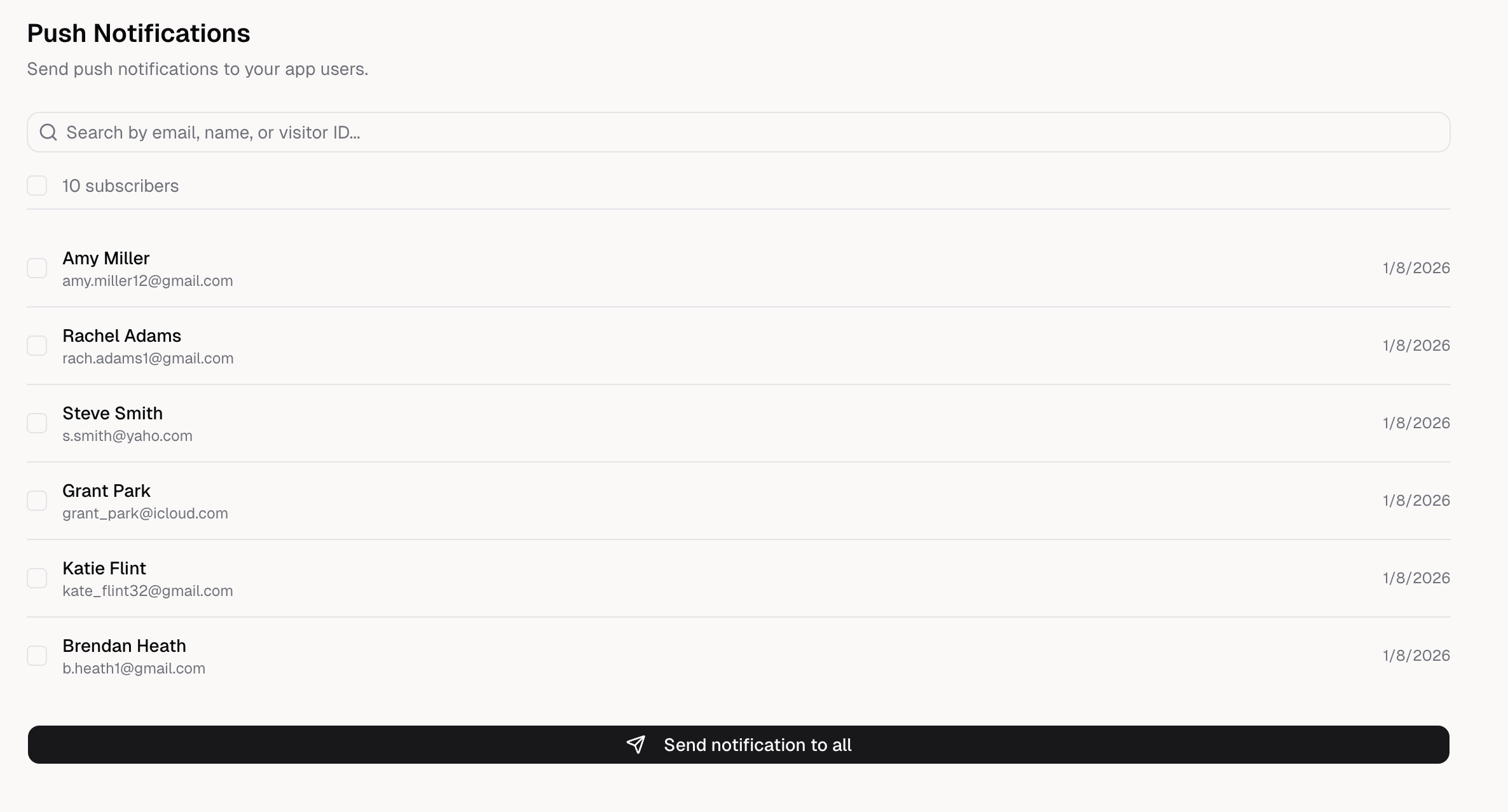
Go to the **Push Notifications** tab to send notifications manually.

When your app supplies an authenticated end user's name or email while registering a subscription,
that app-scoped snapshot is shown here. Anonymous subscribers continue to show their visitor ID.
Devices subscribed from your iOS app are marked **iOS app**.

<Steps>
  <Step title="Select recipients">
    Choose to send to all subscribers, or search and select specific users.

    <div className="screenshot purple">
      <img src="https://mintcdn.com/zeus-0f6dadbf/vyfZOWPi9KdyCPiO/images/apps/push-notification-select-users.png?fit=max&auto=format&n=vyfZOWPi9KdyCPiO&q=85&s=e351db0670b6943d3181532e37663992" alt="Select users to send push notifications" width="2372" height="1278" data-path="images/apps/push-notification-select-users.png" />
    </div>
  </Step>

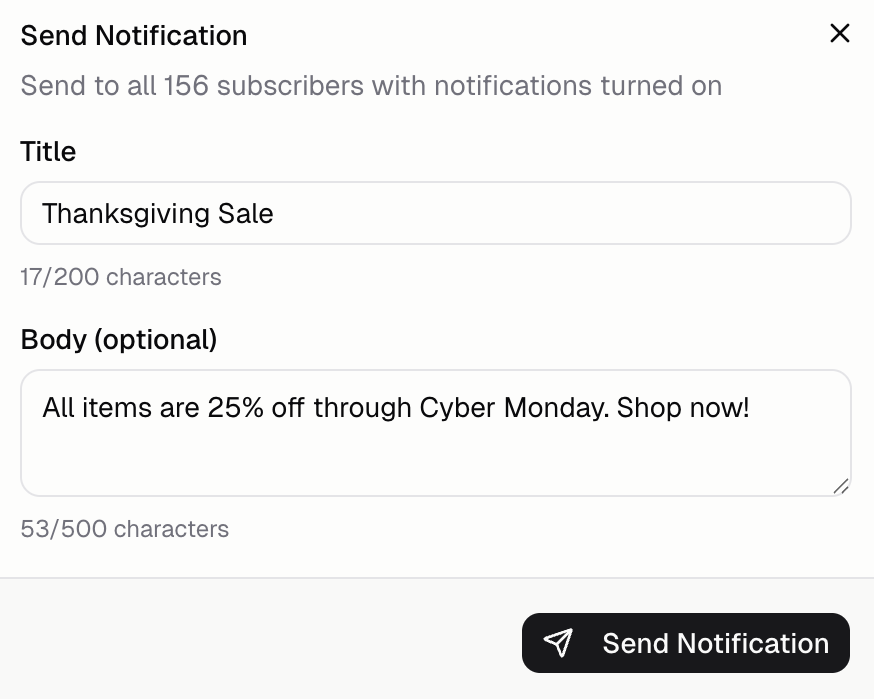
  <Step title="Compose your message">
    Write a title (required) and body (optional). Keep messages short and valuable.

    <div className="screenshot purple">
      <img src="https://mintcdn.com/zeus-0f6dadbf/vyfZOWPi9KdyCPiO/images/apps/push-notification-example.png?fit=max&auto=format&n=vyfZOWPi9KdyCPiO&q=85&s=b0079c82517697b33986f472be7cebfd" alt="Compose push notification message" width="874" height="699" data-path="images/apps/push-notification-example.png" />
    </div>
  </Step>

  <Step title="Send">Click **Send Notification** to deliver immediately.</Step>
</Steps>

### Triggered by events

Send notifications automatically when something happens in your app. Ask Hercules:

* *"Send a notification when an order is placed"*
* *"Notify users when their order ships"*
* *"Send a notification when an order is out for delivery"*
* *"Notify users when their order is delivered"*

### Scheduled from your app

Schedule notifications to send at specific times or after delays. Ask Hercules:

* *"Send a welcome notification 1 hour after sign up"*
* *"Remind users about abandoned carts after 24 hours"*
* *"Let me schedule notifications from an admin page"*

## Test push notifications

Push notifications **do not work in Hercules preview**. Follow the [mobile app testing instructions](/docs/apps/mobile/test-mobile) to test on a real device:

1. Publish your app
2. Install on a real device (Add to Home Screen)
3. Grant notification permission when prompted
4. Send a test notification from **Mobile → Push Notifications**

## FAQ

<AccordionGroup>
  <Accordion title="Do notifications work in Hercules preview?">
    No. Push notifications do not work inside the Hercules preview. You must test on a published URL
  </Accordion>

  <Accordion title="Can I send notifications to specific users?">
    Yes. From the Push Notifications UI, search by email, name, or visitor ID to select specific
    users.
  </Accordion>

  <Accordion title="How do I re-request permission if a user denied?">
    You can't re-prompt programmatically. Guide users to their device settings to enable notifications
    for your app. Show a helpful message with instructions.
  </Accordion>

  <Accordion title="Do notifications work on iOS Safari?">
    Yes, as of iOS 16.4+. Users must add your PWA to home screen first. Notifications won't work from
    Safari directly, only from the installed PWA.
  </Accordion>

  <Accordion title="Can I test iOS app notifications in the simulator?">
    No. Test on a real iPhone with a TestFlight build. The iOS Simulator can't register with Apple for
    push notifications.
  </Accordion>

  <Accordion title="Do notifications work in my App Store iOS app?">
    Yes, once you turn on **iOS push notifications** in the app's mobile settings, upload an APNs key,
    and build again. iOS apps have no web push, so native builds use Apple Push Notification service
    (APNs) instead: your app registers through `window.Capacitor.Plugins.PushNotifications`. See [Send
    notifications to your iOS app](#send-notifications-to-your-ios-app).
  </Accordion>

  <Accordion title="Do notifications work in my Google Play Android app?">
    Not today. The Android app Hercules builds shows your app in Android WebView, which has no web
    push, and the build does not include a native push service. Android users can still get
    notifications from your app installed from the web (PWA) in Chrome. The exception is browser-based
    Android packaging, in an early test for some accounts: that build hands web notifications to a
    compatible browser.
  </Accordion>

  <Accordion title="What can I customize in a notification?">
    * **Title:** Bold headline (keep it short, max 200 characters) - **Body:** Main message (optional,
      max 500 characters) **Known limitation:** Web notifications can't deep-link to a specific screen.
      They open the app generically. In your iOS app, a tapped notification can open a specific screen.
  </Accordion>
</AccordionGroup>


This documentation is built and hosted on [Mintlify](https://mintlify.com), a developer documentation platform.