> ## Documentation Index
> Fetch the complete documentation index at: https://hercules.app/docs/llms.txt
> Use this file to discover all available pages before exploring further.
# Security Headers
> Add security response headers to your published app. Configure HSTS, X-Frame-Options, and Permissions-Policy under More → Security in the App Builder.
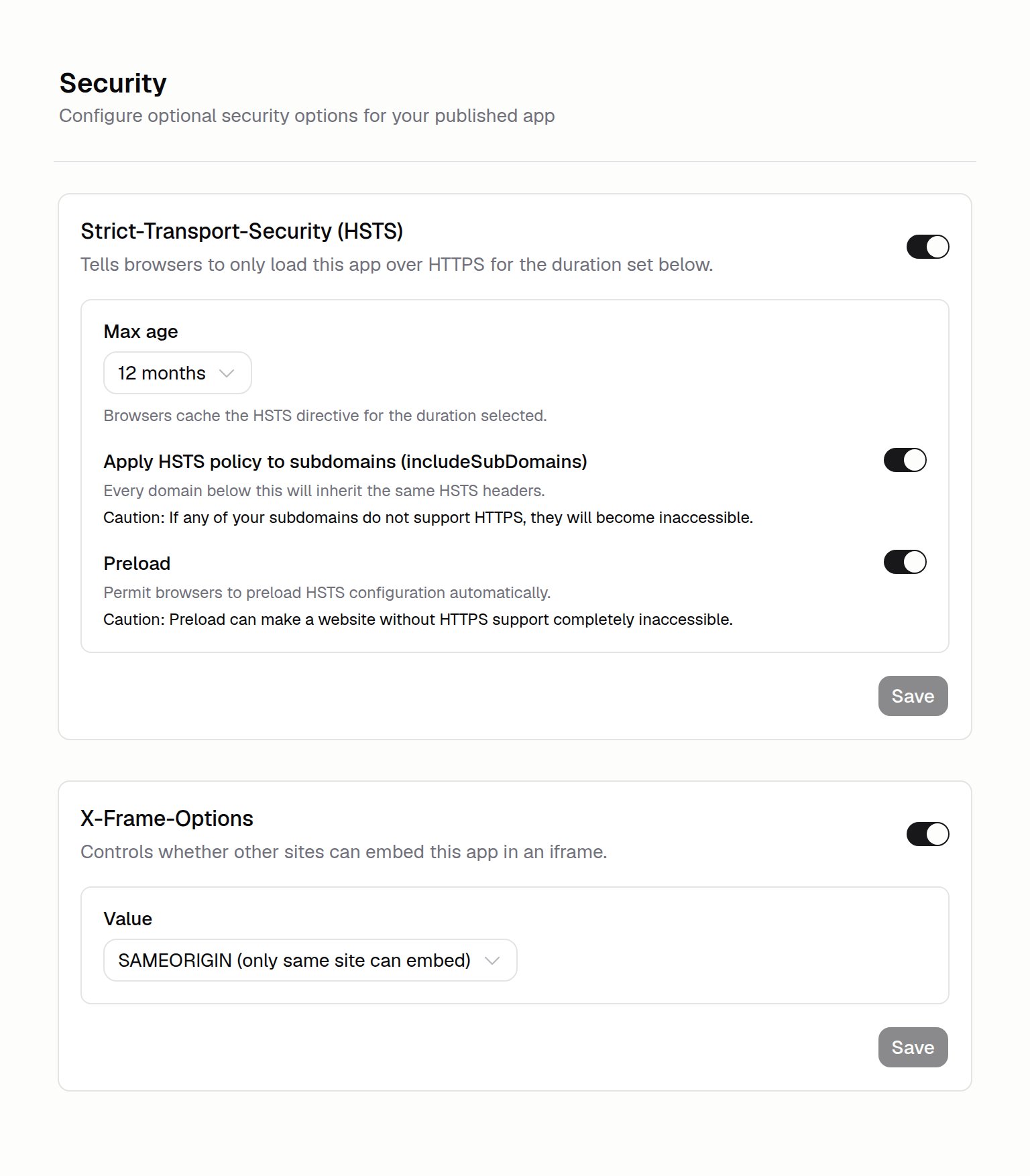
Security headers tell browsers how to handle your published app, adding protection against common attacks. Configure them under **More → Security** in the App Builder. Every header is off by default, so you turn on only what you need.
### Where do I configure security headers?
Click **More → Security** in the App Builder sidebar. Each header has its own card with a toggle to turn it on, plus its own **Save** button. Changes apply to your published app.
### What is HSTS?
HSTS (HTTP Strict Transport Security) tells browsers to only load your app over HTTPS (the secure, encrypted version of a web address). Turn it on to stop browsers from ever loading your app over an insecure connection.
Options:
* **Max age:** How long browsers remember the HTTPS-only rule, from 1 month to 12 months.
* **Apply to subdomains (includeSubDomains):** Extends the rule to every subdomain under your domain.
* **Preload:** Adds your app to the browser preload list, so browsers use HTTPS on the very first visit. This needs **Apply to subdomains** turned on and a **12 month** max age.
HSTS locks browsers into HTTPS for the max age you set. Before you turn off HTTPS or move your app
off Hercules, disable HSTS first and wait for the max age to lapse. Otherwise your app can become
unreachable for visitors until HTTPS is available again.
### What is X-Frame-Options?
X-Frame-Options controls whether other websites can embed your app in an iframe (your page shown inside another site's page). This helps prevent clickjacking (tricking users into clicking hidden elements).
Choose a value:
* **DENY:** No other site can embed your app.
* **SAMEORIGIN:** Only pages on your own domain can embed your app.
### What is Permissions-Policy?
Permissions-Policy blocks browser features your app does not use, such as camera, microphone, geolocation, and payment. Turn on the features you want to block. Features you leave unchecked keep their default browser behavior.
### Do security headers change my app's code?
No. Headers are added to the responses your published app sends to browsers. Your app's code and content stay the same.
### Additional FAQ
No. All headers are off by default. They are optional hardening for your published app. Turn on
the ones that fit your needs.
Preload requires **Apply to subdomains** turned on and a **12 month** max age. Set both and the
toggle becomes available.
Hercules shows a confirmation that explains the HTTPS lock-in and caching trade-offs before you
save. Read it, then confirm to continue.
A [Security Audit](/docs/apps/security) reviews your app for vulnerabilities and suggests fixes.
Security headers are settings you configure to harden your published app. Use both together.
The headers on this page are configured from the Hercules UI under **More → Security**. For any
other code-based security or SEO headers, ask the Hercules AI Agent to configure them directly
in your code.