> ## Documentation Index
> Fetch the complete documentation index at: https://hercules.app/docs/llms.txt
> Use this file to discover all available pages before exploring further.
# Audit Log
> See who signed in to your app, from where, and what was blocked. Every sign-in, sign-up, password reset, and session revocation is recorded.
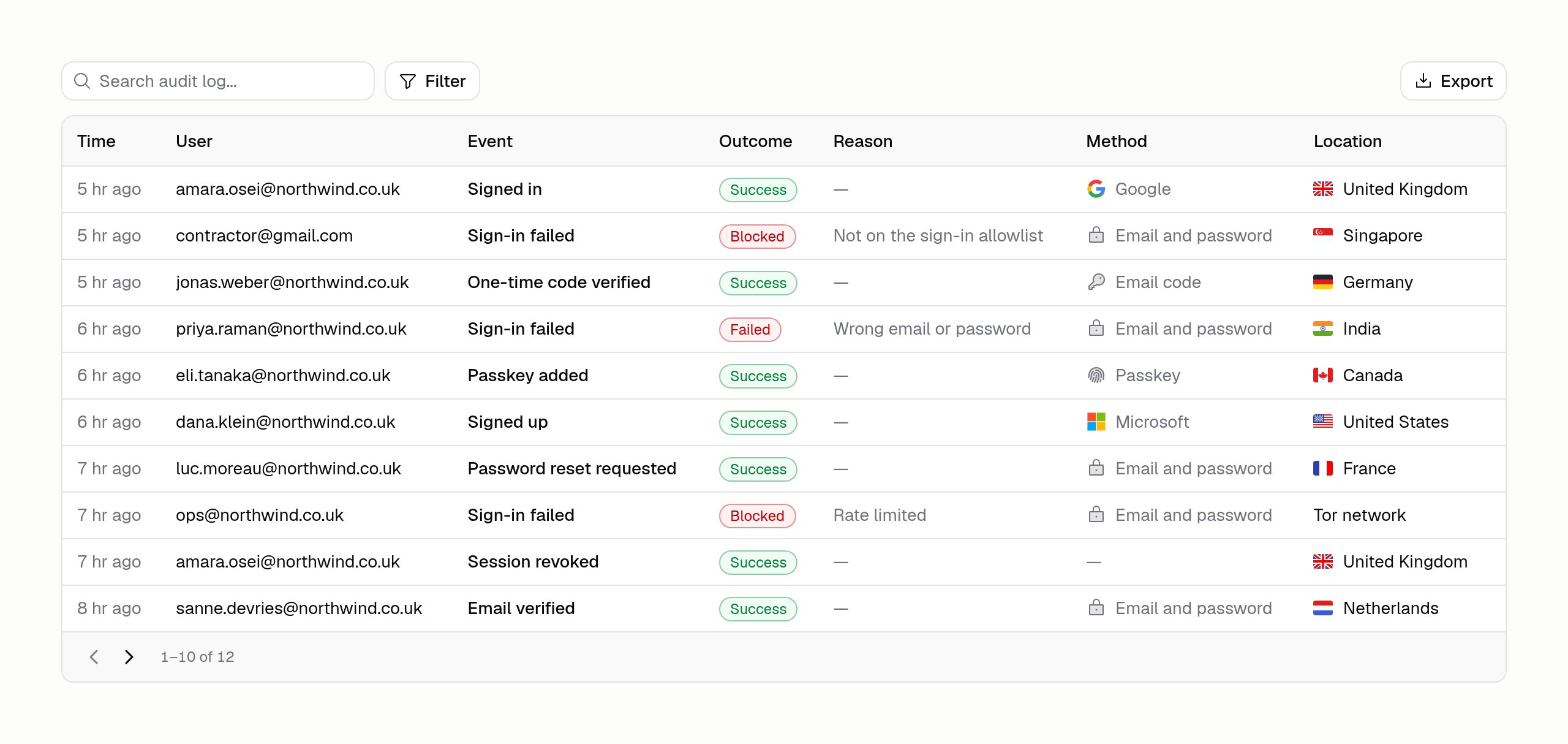
Hercules records every authentication event on your app and shows it under **Users & Access**. Use it to see who signed in, from where, what was blocked, and why.
### Where do I find the audit log?
Click **Users & Access** → **Audit Log** in your app sidebar.
The audit log is available on apps using Hercules Auth 2.0. If your app was created before Hercules Auth 2.0, [upgrade it first](/docs/apps/users-auth/upgrade-to-hercules-auth-2).
### What gets recorded?
Sign-in, sign-up, sign-out, and session revocation, plus the account-security events:
* **Passwords**: reset requested, reset completed, and changed
* **Email**: verification sent, verified, and changed
* **One-time codes**: sent, verified, and failed
* **Passkeys**: added and removed
* **Accounts**: unlinked, banned, and unbanned
### What does each row tell me?
| Column | What it means |
| ------------ | ------------------------------------------------------------------------ |
| **Time** | When it happened |
| **User** | The account it happened to, or the address someone typed if none matched |
| **Event** | What was attempted, like "Signed in" or "Password reset" |
| **Outcome** | Success, Blocked, or Failed |
| **Reason** | Why it was blocked or failed, like "Not on the sign-in allowlist" |
| **Method** | How they signed in, like Google, a passkey, or an email code |
| **Location** | The country the request came from, on Business and Enterprise plans |
### How do I find one person's history?
Open **Users & Access** → **Users**, find the person, and choose **See audit log** on their row. That opens the log filtered to them, and the address bar carries the filter, so you can paste the link into a ticket.
You can also search the log by email address or IP address, and filter by event, outcome, method, and country.
### Can I export it?
Yes. Click **Export** to download the events matching your current filters as a CSV file. It covers every match up to the 5,000 most recent, not only the rows you have scrolled to. If your filters match more than that, Hercules tells you the export was trimmed, so narrow the range and export again.
### Which plans include it?
Free and Pro apps see the 10 most recent events, which is enough to confirm that recording is working. Location is hidden on those plans. Business and Enterprise plans get the full history and every column, along with search, filtering, and export.
Hercules keeps recording events on every plan. Upgrading later opens the history that was already
captured, rather than starting from the day you upgrade.