
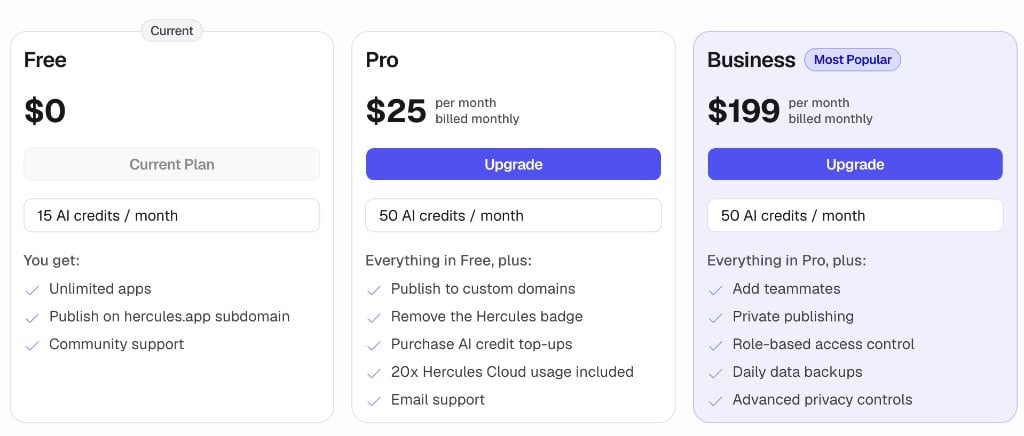
What features are available in each plan?
Your Hercules billing portal shows the features, plans, and pricing available to your organization. Our pricing page shows the latest features, pricing, and plans.What are AI credits?
AI credits power the Hercules App Builder Agent. You use AI Credits every time you talk to Hercules to build your app. Your plan includes a monthly allocation of AI credits. You can buy more credits anytime. Learn more in AI Credits.What are cloud credits?
Cloud credits cover the hosting cost of your app after it is published and any built-in Hercules services. Learn more in Cloud Credits.How do plan upgrades work?
When you upgrade:- You pay only the prorated difference between your current and new plan
- You immediately receive the prorated AI credit difference between your current and new plan, not the full amount
- These AI credits expire 28 days after the grant date
- Your billing cycle does not reset. It stays anchored to your original sign up date
Note: Upgrades only take effect immediately if your new plan is more expensive
than your current one. If the new plan costs less (even if it’s a higher tier), it is considered a
downgrade.
How do plan downgrades work?
Downgrades are scheduled to take effect at the start of your next billing cycle. You keep your current plan until then.Additional FAQ
How do I get the Enterprise plan?
How do I get the Enterprise plan?
The Enterprise plan is custom. Email sales@hercules.app and our team
will reach out to set up a plan that fits your needs.
What payment methods are accepted?
What payment methods are accepted?
- Credit and debit cards (Visa, Mastercard, Amex, Discover)
- Google Pay
- Apple Pay
What payment methods are not accepted?
What payment methods are not accepted?
Hercules only accepts cards. Apple Pay and Google Pay work because they pay with a card you have
saved. Everything else is not accepted, including:
- Mir cards. Stripe, the company that processes our payments, does not support the Mir network
- Bank transfers and direct debit, such as ACH, SEPA Direct Debit, wire transfer, iDEAL, and Bancontact
- Local bank payment systems, such as UPI (India) and Pix (Brazil)
- Payment apps and wallets, such as PayPal, Cash App Pay, Amazon Pay, Alipay, and WeChat Pay
- Buy now, pay later, such as Klarna, Afterpay, and Affirm
- Cryptocurrency
- Cash vouchers, such as OXXO, Boleto, and Konbini
- Purchase orders, checks, and manual invoicing
How do I change my billing information (like add my Tax ID)?
How do I change my billing information (like add my Tax ID)?
You can change your billing name, address and Tax ID by going to Settings → Billing → Billing
Details
What happens if my bill is overdue?
What happens if my bill is overdue?
You have 7 days to pay. After that, you’ll be downgraded to the free plan. Custom domains will be
disconnected, hosting will be limited to Free plan limits, and your app could be shut off.
Will paying an overdue invoice restore my plan status?
Will paying an overdue invoice restore my plan status?
Yes. Paying an overdue invoice restores your plan and grants your credit allocation as
soon as it’s paid.If you don’t pay within a certain number of days of the invoice being overdue, your organization
is instantly downgraded to the free plan.
Why is it scheduling my upgrade? I want to upgrade immediately
Why is it scheduling my upgrade? I want to upgrade immediately
Upgrades to a higher AI credit allocation in your current plan, or the same or higher AI credit
allocation in a higher tier, take effect immediately. Upgrades to a lower AI credit allocation in
a higher tier are scheduled for your next billing cycle.
How do I change/remove my payment method?
How do I change/remove my payment method?
You can change/remove your payment method by going to Settings → Billing → Payment Methods
How do I cancel my plan?
How do I cancel my plan?
Go to Settings → Billing → Plans. You can then click “downgrade” on the Free plan or click
“Manage and Cancel” at the bottom of the page.
Why is my plan and pricing different from other customers?
Why is my plan and pricing different from other customers?
Customers are offered different plans depending on when they signed up. Your exact plan and pricing is whatever appears in Settings → Billing for your organization.If you would like custom pricing, please reach out to sales@hercules.app
What is the difference between a Hercules Plan and Hercules Commerce?
What is the difference between a Hercules Plan and Hercules Commerce?
Hercules Commerce is a separate feature that lets you sell products and accept payments through
your app. It is not related to your Hercules plan or billing. Learn more in the Hercules Commerce
docs.
Do you have a discount for students?
Do you have a discount for students?
No, we don’t offer a student discount at this time.
Do you have a discount for non-profits?
Do you have a discount for non-profits?
Yes. We’re open to offering a 15% discount on plans. Contact support to have
it applied to your account.
What is the Lite plan?
What is the Lite plan?
A special plan Hercules offered in the past to certain organizations. It is no longer available.
What is the Ultra plan?
What is the Ultra plan?
A special plan Hercules offered in the past to certain organizations. It is no longer available.