
Agents is in private beta, so things may change. If you hit a problem, tell us via Support &
feedback.
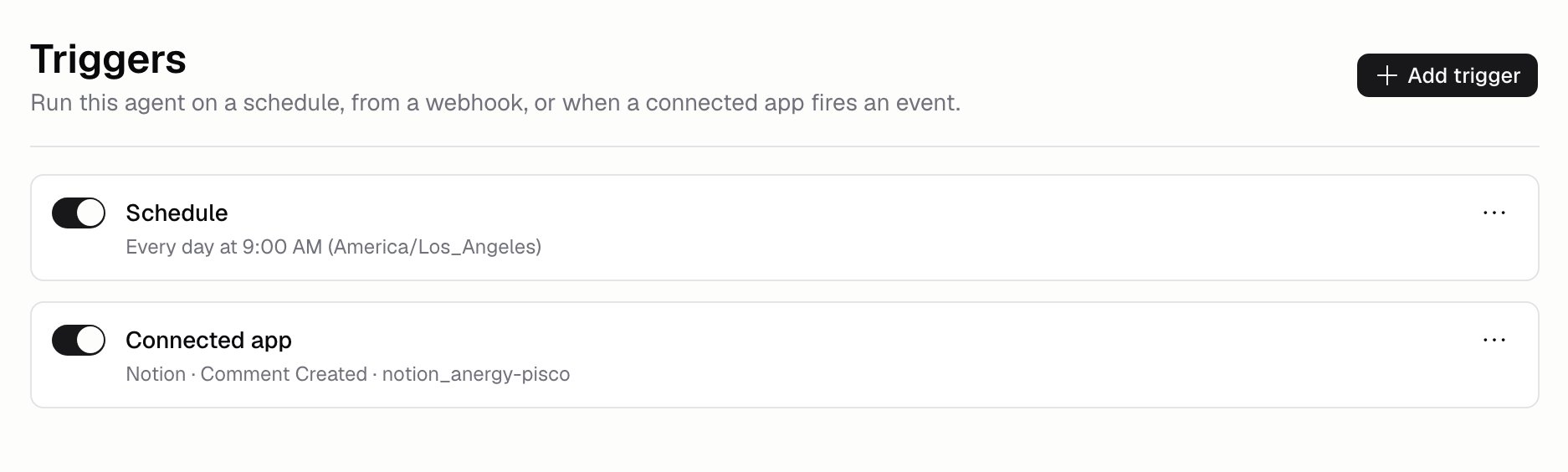
What kinds of trigger are there?
How do I schedule an Agent?
Add a Scheduled trigger, set when it should run, and pick a timezone. Hercules repeats the schedule back to you in plain English, so you can check it before saving. Give it a name if you like, for exampleWeekday morning digest.
How do I use a webhook trigger?
Add a Webhook trigger and copy its web address. Have the other system POST its event to that address, and each POST starts a run the Agent can read the event from. Other kinds of request don’t start anything. Anyone with the address can start your Agent, so keep it secret. Treat it like a password.How do I start an Agent from another app?
Search the trigger catalog for the app, for example Stripe or Linear. Filter by Connected to see only the apps your Organization has already set up. Pick the app, then choose which events should start a run. For GitHub you pick the repository from a list rather than typing it, and you can type one in if it isn’t there. If the connection fails, the trigger tells you why. If the app you need is missing, click Suggest a trigger.Additional FAQ
How do I see what a trigger actually did?
How do I see what a trigger actually did?
Open Run history. Every run names the trigger behind it, and webhook runs
also show what was sent to them.
How do I stop an Agent running?
How do I stop an Agent running?
Switch the trigger off. Each one has its own toggle, so you can pause a schedule and leave the
rest running, then switch it back on later without setting it up again. Deleting it works too.
Channels have the same toggle.
Can a scheduled run go on forever?
Can a scheduled run go on forever?
Not if you set a limit. Build → More → Run limits caps how long a single run can take
and how much it can spend. See Costs and limits.
Can I test a trigger before relying on it?
Can I test a trigger before relying on it?
Test the Agent itself in the test chat first, so you know the instructions work. Then add the
trigger and check the first real run in History.
What is the difference between a trigger and a channel?
What is the difference between a trigger and a channel?
A trigger starts a run from a clock or an event. A channel starts a run
because a person @-mentioned the Agent in Slack, GitHub, Linear, or another chat tool, and the
Agent replies to them there.