
Agents is in private beta, so things may change. If you hit a problem, tell us via Support &
feedback.
What do Save and Publish do?
The bar always tells you where you are: unsaved changes, saving, a draft that isn’t published yet, an older version you’ve opened, or a save that didn’t work. Press Cmd + S / Ctrl + S to save.
Drafts don’t save themselves. Nothing is kept until you press Save, so a half-finished idea is
never left for a teammate to find.
How do I go back to an earlier version?
1
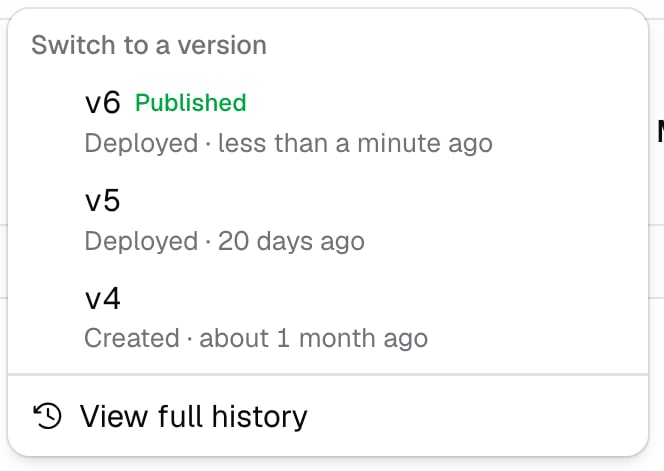
Open the version list
Click the version name in the bar.
2
Pick a version
Choose the one you want. It opens in the editor so you can read it first.
3
Publish it
Click Publish to make it live.
What’s saved in a version?
Everything that makes the Agent what it is: its instructions, model, integrations and which of their tools it can use, skills, subagents, and issue access. These go into your draft, and you’ll see them in the version history. Everything else saves the moment you change it, and doesn’t create a version: triggers, channels, guardrails, run limits, description, tags, and starter prompts.Additional FAQ
Can I see what changed between versions?
Can I see what changed between versions?
Yes. The version history shows each version next to the one before it, so you can read exactly
what changed in the instructions and see a summary line for everything else.
Is a saved draft safe?
Is a saved draft safe?
A saved draft isn’t a version. The next Save or Publish writes over it. If it matters, publish it.
What happens to runs already going when I publish?
What happens to runs already going when I publish?
A run finishes with the version it started on. Publishing only affects runs that start afterwards.
Can I compare versions?
Can I compare versions?
Yes, that’s what a baseline is for. An evaluation lets you pick which
version answers, so you can run the same questions against two versions and compare them.