

Your Hercules Subscription tier determines which Hercules platform features you can access. Each tier also includes a certain amount of AI Credits and Cloud Credits.Documentation Index
Fetch the complete documentation index at: https://hercules.app/docs/llms.txt
Use this file to discover all available pages before exploring further.
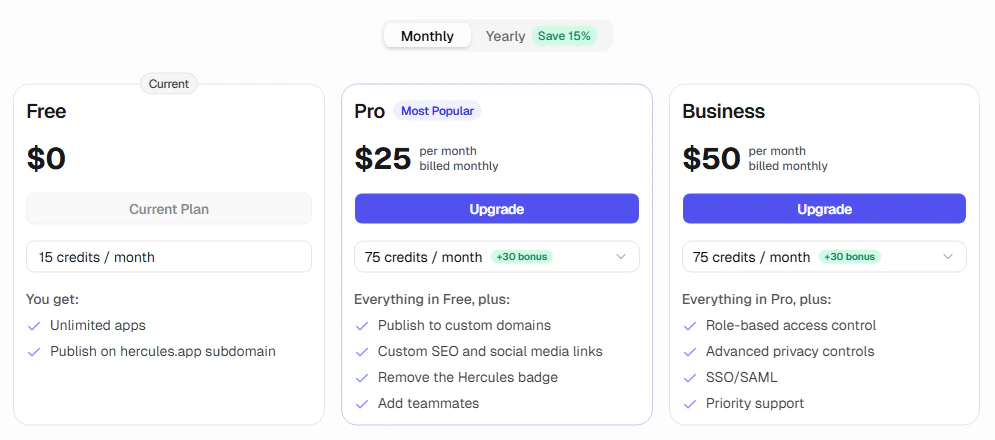
What features are available in each plan?
See our pricing page for a complete comparison of features in each plan.What are AI credits?
AI credits power the Hercules AI Agent. You use AI Credits every time you talk to Hercules. Your subscription plan includes a monthly allocation of AI credits. You can buy more credits anytime. Learn more in AI Credits.What are cloud credits?
Cloud credits (your Cloud Balance) cover Hercules Cloud hosting usage beyond your subscription plan’s included limits. It also covers any AI inference triggered inside your published app through the Hercules AI Gateway. Learn more in Cloud Credits.How do subscription upgrades work?
When you upgrade:- You pay only the prorated difference between your current and new plan
- You immediately receive the prorated AI credit difference between your current and new plan, not the full amount
- These AI credits are valid for 28 days from the grant date
- Your billing cycle does not reset. It stays anchored to your original sign up date
Note: Upgrades only take effect immediately if your new plan is more expensive
than your current one. If the new plan costs less (even if it’s a higher tier), it is considered a
downgrade.
How do subscription downgrades work?
Downgrades are scheduled to take effect at the start of your next billing cycle. You keep your current plan until then.Additional FAQ
What payment methods are accepted?
What payment methods are accepted?
Credit/debit cards, Google Pay, and Apple Pay.
How do I change my billing information (like add my Tax ID)?
How do I change my billing information (like add my Tax ID)?
You can change your billing name, address and Tax ID by going to Settings → Billing → Billing
Details
What happens if my bill is overdue?
What happens if my bill is overdue?
You have 7 days to pay. After that, you’ll be downgraded to the free plan. Custom domains will be
disconnected, hosting will be limited to free tier limits, and your app could be shut off.
Why is it scheduling my upgrade? I want to upgrade immediately
Why is it scheduling my upgrade? I want to upgrade immediately
Upgrades to a higher AI credit allocation in your current plan, or the same or higher AI credit
allocation in a higher tier, take effect immediately. Upgrades to a lower AI credit allocation in
a higher tier are scheduled for your next billing cycle.
How do I change/remove my payment method?
How do I change/remove my payment method?
You can change/remove your payment method by going to Settings → Billing → Payment method
How do I cancel my subscription?
How do I cancel my subscription?
Go to Settings → Billing → Plans. Then click “downgrade” on the Free plan.
What is the difference between a Hercules Subscription and Hercules Commerce?
What is the difference between a Hercules Subscription and Hercules Commerce?
Hercules Commerce is a separate feature that lets you sell products and accept payments through your app. It is not related to your Hercules subscription or billing. Learn more in the Hercules Commerce docs.