
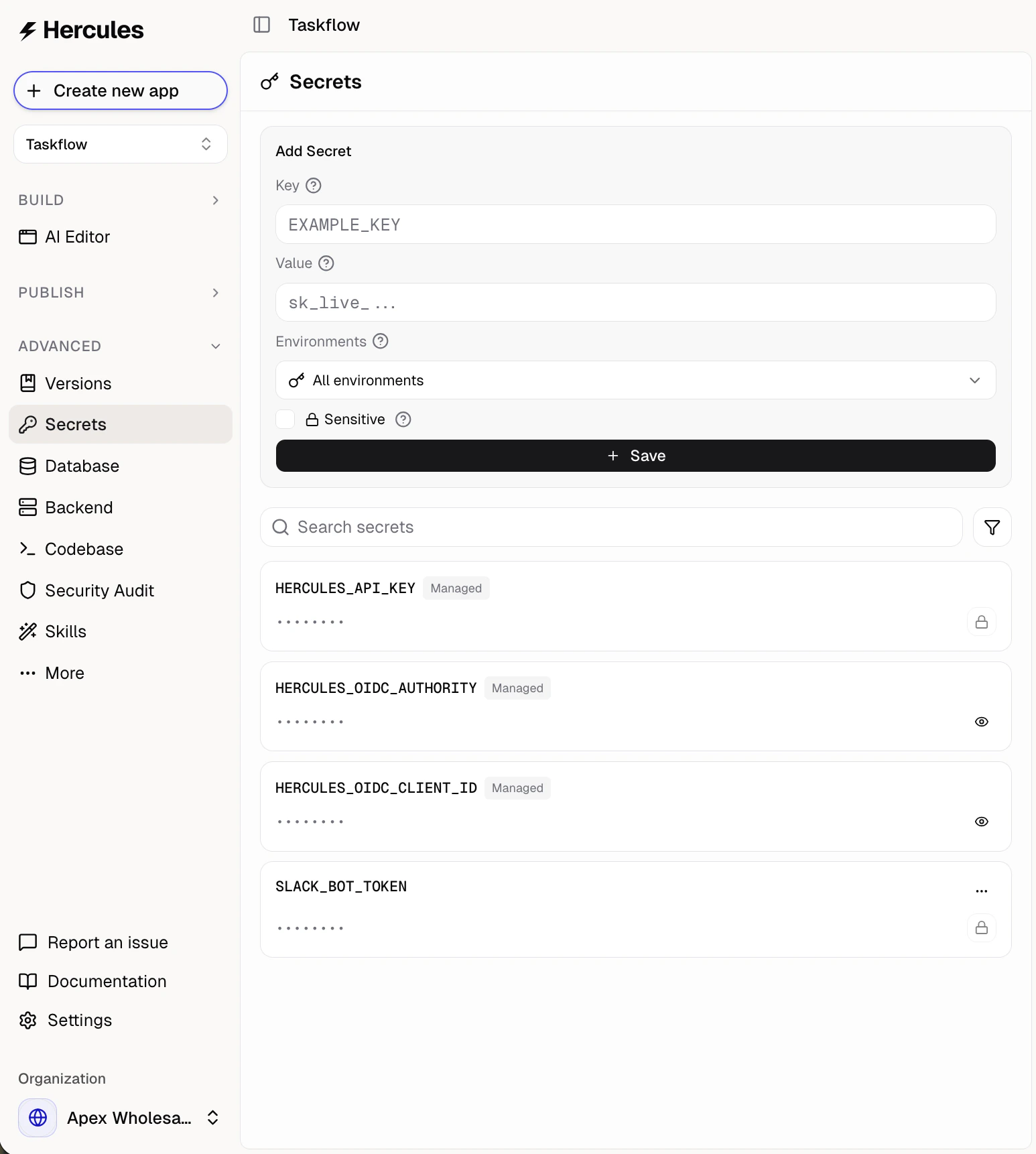
How do I add a secret?
- Open Advanced → Secrets in the sidebar (scroll down to find the Advanced group)
- Fill in the Key and Value fields:
- Key is the variable name your code reads, written in capitals with underscores. Examples:
OPENAI_API_KEY,STRIPE_SECRET_KEY,TWILIO_API_KEY. - Value is the secret itself, copied from the provider. Examples:
sk-...for OpenAI,sk_live_...for Stripe.
- Key is the variable name your code reads, written in capitals with underscores. Examples:
- Pick which environments should receive it: Production, Development, or both
- Click Save
How do I use secrets in my app?
Hercules automatically uses your secrets when building features:- “Send emails with SendGrid” uses your
SENDGRID_API_KEY - “Send SMS with Twilio” uses your
TWILIO_API_KEY
process.env.SECRET_NAME.
What are environments?
Each secret is scoped to one or more environments:- Production is your live app.
- Development covers your development deployments.
Can I mark a secret as sensitive?
Yes. Check Sensitive when adding a secret to encrypt and hide the value after saving. Sensitive values can’t be revealed again. To change a sensitive secret, edit it and enter a new value (leave blank to keep the current one).Can Hercules AI see my secrets?
Hercules AI can see your secret names but not values. This lets it reference the correct secret when building features without exposing sensitive data.Additional FAQ
What are managed secrets?
What are managed secrets?
Hercules includes some predefined secrets for internal functionality (Hercules API keys, auth/OIDC
tokens). These are marked as managed and you can’t edit or delete them.
Can I have different values for the same key per environment?
Can I have different values for the same key per environment?
Yes. Add the same key twice, once scoped to Production and once scoped to Development, each with
its own value.
What if I accidentally expose a secret?
What if I accidentally expose a secret?
Immediately delete the old secret (in Hercules and the third-party) and create a new one with the
fresh key.
How are secrets stored?
How are secrets stored?
Secrets are encrypted at rest and never appear in your code or logs.
I see an error that a secret is missing or not available
I see an error that a secret is missing or not available
First, check if the error affects all secrets or just one specific secret (for example, just
VITE_HERCULES_OIDC_AUTHORITY is missing).All secrets: This usually resolves within 30 seconds. If it doesn’t, contact
support immediately.One specific secret: Confirm the secret exists and is scoped to the right environment
(see above).Can my Hercules app's backend make outbound HTTP calls to an external database like Neon Postgres?
Can my Hercules app's backend make outbound HTTP calls to an external database like Neon Postgres?
Yes. Backend functions (Actions) can make outbound HTTP calls via
fetch. Use an HTTP-based
driver (for example, Neon’s serverless HTTP driver). Raw TCP (port 5432) is not available in the
default runtime.Store connection strings in Secrets (Advanced → Secrets). They are delivered as
process.env. There are no egress restrictions or domain allowlists. Actions can run up to 10
minutes. Return values are capped at 16 MB. Outbound IPs are listed on the
Backend page.