
[myapp].onhercules.app domain, and you can add a custom domain anytime.
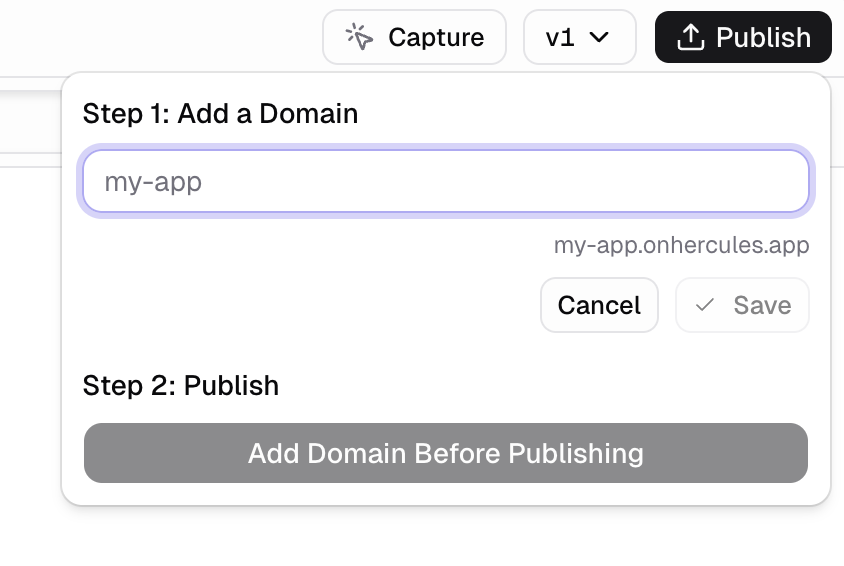
How do I publish my app?
Click Publish in the top right corner of the App Builder, then enter a subdomain name. On a phone, tap Preview at the bottom of the screen first. The Publish button then appears at the top.How do I publish a new version?
Click Publish again to ship your latest changes. Your app is not updated until you republish.How do I publish to my own domain?
Buy a domain in Hercules
Connect an existing domain
Additional FAQ
How do I unpublish my app?
How do I unpublish my app?
Click Publish in the top right corner, then click the pencil icon next to your subdomain.
This takes your app offline until you republish.
I am not seeing my published site
I am not seeing my published site
- Check that you published the latest version. 2. Check that it is not flagged as spam. See Free Hercules subdomain for antivirus and spam issues.
My account is in review and I cannot publish
My account is in review and I cannot publish
This is Hercules Commerce payout verification, run by Stripe.
Hercules cannot skip it.
- Click Commerce → Payouts → Update
- Submit the missing business information and documents
- Verification finishes within a few business days