
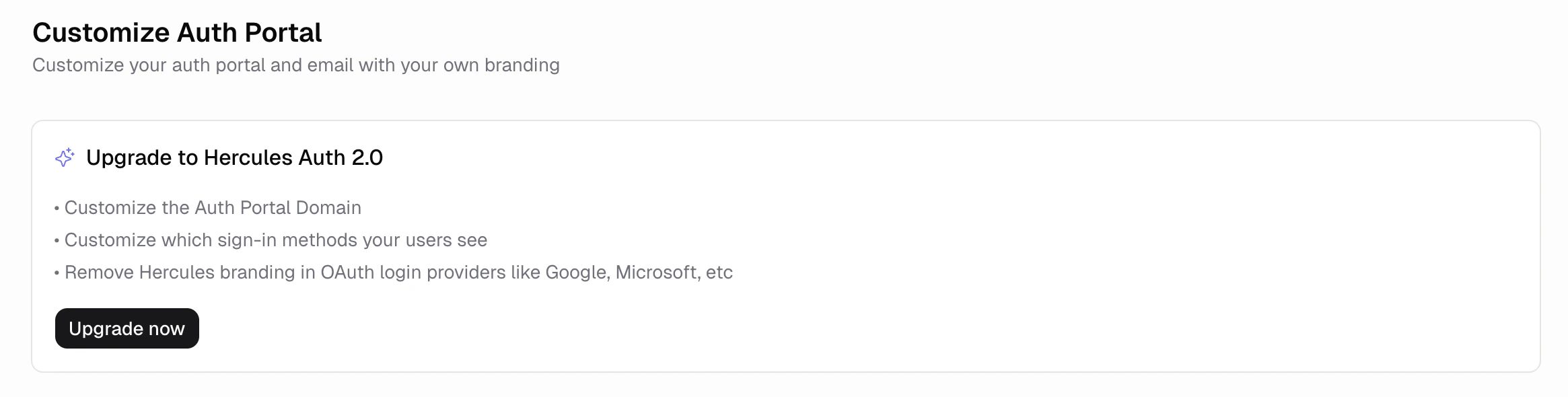
What is Hercules Auth 2.0?
The previous Hercules Auth uses a shared sign-in flow across all Hercules apps. Hercules Auth 2.0 gives each app its own setup, so you can:- Choose which sign-in methods to show your users
- Use your own developer credentials so your app’s name appears on social sign-in screens, instead of the Hercules name
- Host the sign-in page on your own domain
How do I start the upgrade?
Click Users & Access → Auth Portal in your app sidebar. If your app is eligible, you’ll see the Upgrade to Hercules Auth 2.0 card. Click Upgrade now and confirm to start.What happens during the upgrade?
We move your existing users to Hercules Auth 2.0. If your app is published, we re-publish it with the new auth. The upgrade takes a few minutes. Keep the tab open while it runs.Will my users need to sign in again?
Yes. Your active users will need to sign in once more after the upgrade. All their data, accounts, and sign-in history is preserved.What new features do I get after upgrading?
The Auth Portal tab shows new options:- Sign-in methods: Pick which options your users see (Google, Microsoft, email codes, email and password, etc.)
- Your own developer accounts: Connect your own credentials so your app’s name appears on Google, Microsoft, and Apple sign-in screens.
- Custom auth domain: Host the sign-in page on your own domain, like
auth.yourapp.com.
What do I do if the banner says “Contact support”?
Some apps have user data in a format we can’t migrate automatically. For these, the upgrade card shows a Contact support button instead of Upgrade now. Click the button. We pre-fill an email with your account, app, and the reason from your dashboard. Send it to us and we’ll take it from there.Is the upgrade reversible?
No. Once your app is on Hercules Auth 2.0, you stay on it. Your data and users are preserved, but you can’t switch back to the previous auth.Additional FAQ
How long does the upgrade take?
How long does the upgrade take?
A few minutes for most apps. Keep the tab open while it runs so you can see when it finishes.
What if I close the tab during the upgrade?
What if I close the tab during the upgrade?
The upgrade continues in the background. Reopen the Users & Access tab any time to see the
current status. We recommend keeping the tab open until it finishes so you can confirm everything
worked.
What if the upgrade fails?
What if the upgrade fails?
We try to roll your app back to the previous auth setup. You’ll see a Retry button on the upgrade
card. If the failure happened after we re-published your app, your live app may be temporarily
broken; click Publish in the dashboard to restore it, or Retry to attempt the upgrade
again. If retries keep failing, click Support & feedback in the sidebar or email
hello@hercules.app.
Will my published app go down during the upgrade?
Will my published app go down during the upgrade?
There’s a brief interruption while we re-publish your app with the new auth. End users may need to
refresh the page once the upgrade finishes, and will be asked to sign in again.
Why don't I see the upgrade card?
Why don't I see the upgrade card?
Most often it’s because your app is already on Hercules Auth 2.0, either you upgraded earlier or
the app was created after Hercules Auth 2.0 shipped. If you think you should see it but don’t,
email hello@hercules.app and we’ll help.
Do I have to upgrade?
Do I have to upgrade?
No. Your existing app keeps working as is. The new sign-in features (provider toggles, your own
developer accounts, custom auth domain) are only available after upgrading.
Can I upgrade multiple apps at once?
Can I upgrade multiple apps at once?
No. Each app upgrades independently. Open the Users & Access tab on each app to upgrade them
one at a time.
Will the upgrade affect my custom domain or published URLs?
Will the upgrade affect my custom domain or published URLs?
No. Your custom domain, subdomain, and published URLs all stay the same. The upgrade only changes
how authentication works behind the scenes, plus the new sign-in features you can configure
afterward.